
TABLE OF CONTENTS
- Introduction
- Setting a Nominated Subcontractor Organisation
- Reporting on Subcontracted Activity
- Important Information
- FAQs
- Additional Support
Introduction
This article explains how subcontracted activity can be included in contract reporting within Ardens Manager.
Some services delivered by GP practices may be carried out either within the practice itself or by a nominated subcontractor, such as a PCN hub. This reporting option allows activity completed at both locations to be included when reviewing performance.
Background
In some areas, GP practices subcontract elements of locally commissioned services to other organisations, such as Primary Care Network (PCN) hubs or shared service providers.
For example, a service such as NHS Health Checks may be delivered:
- directly within the GP practice, or
- by a nominated hub organisation acting on behalf of the practice.
In these cases, Commissioners may wish to view combined activity, showing work completed either at the practice or by the subcontracted provider.
To support this model, Ardens Manager allows certain reports to include activity recorded at both the practice and an approved subcontractor organisation.
How Ardens Can Help?
Ardens Manager supports this reporting requirement by allowing organisations to define approved subcontractor organisations within their organisation settings.
When configured, specific reports can include activity that has been recorded:
- At the practice itself, or
- At a nominated subcontractor organisation (know in Ardens Manager as Nominated Partners.
This enables commissioners and practices to view a more complete picture of service delivery when activity may take place across multiple locations.
Setting a Nominated Subcontractor Organisation
Subcontractor organisations are configured within Organisation Settings. Only System Administrators can update these settings.
To configure a nominated subcontractor:
- Navigate to Setting by clicking on your name in the top right corner.
- Click on your Organisation name along the left panel
- This action will open the Organisation Settings to the right
- Locate the Nominated Subcontractor(s) setting near the bottom of the page
- Select the appropriate organisation(s) from the list.
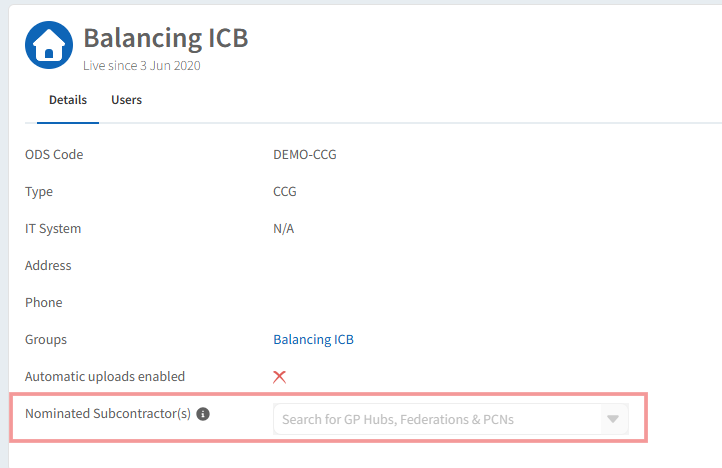
Currently, subcontractor organisations are typically configured as Hub organisations, such as a PCN hub providing services on behalf of practices.
 Please note: If your subcontractor or hub is not available in the list, please contact our Support Team with the organisation name and ODS code so it can be added.
Please note: If your subcontractor or hub is not available in the list, please contact our Support Team with the organisation name and ODS code so it can be added.Reporting on Subcontracted Activity
When a report has been configured to include subcontracted activity, this will be visible within the Rules tab of the report.
Under the Activity section you will see the following rule:
Organisation done at (At event) is Logged in organisation or nominated partner
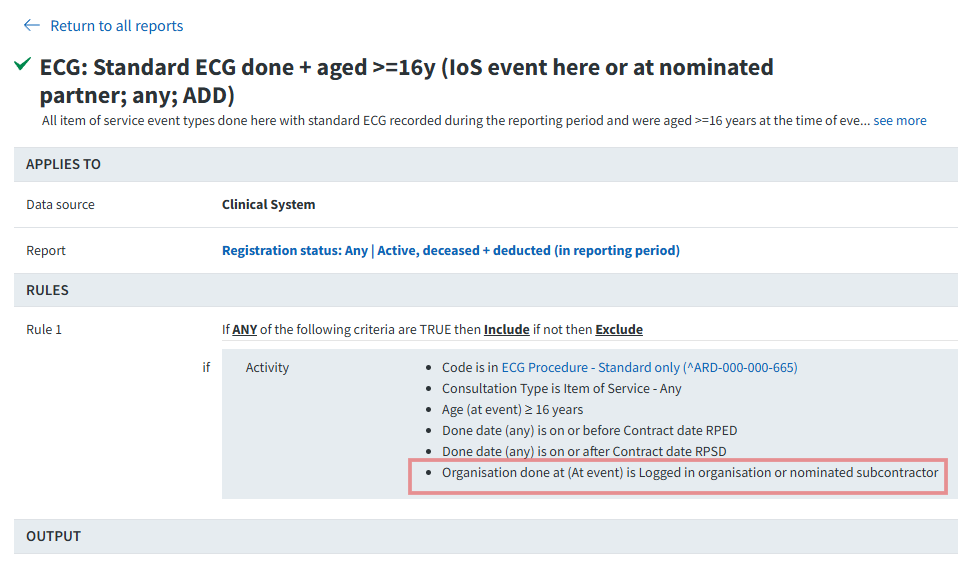
This rule indicates that the report includes activity recorded as completed:
- at the logged in organisation (for example, the GP practice), or
- at a nominated partner (subcontractor), such as a PCN hub.
This allows the report to reflect activity delivered across both the practice and the subcontracted provide.
Important Information
- This reporting option is only available on specific reports where it has been configured.
- This rule is configured when the report is created and cannot be changed by end users.
- Reports using this logic will typically be created in response to commissioner requirements for local contracts.
- Not all dashboards or reports will include this option.
FAQs
1 . What types of organisations can be added as subcontractors?
Currently, subcontractor organisations are typically configured as Hub organisations, such as PCN hubs delivering services on behalf of practices. Additional organisation types may be supported in the future.
2. Does this mean patient data is shared between organisations?
No. This reporting option only allows activity to be counted across organisations for reporting purposes. Access to patient-level data remains restricted to authorised users within the relevant organisation.
Additional Support
To further your understanding of the Ardens Manager platform:
- Book training for your GP Practice, PCN or ICB.
- Explore more helpful support articles.
If you require any further assistance on the process above, please contact Ardens support on: